Turbosound Speakers
Channel setup, hookup and mounting for the Turbosound iQ speakers (iQ12 main + iQ15B sub).
Quick reference: ULTRANET channel
Main and sub are separate speakers – each one is set on its own back panel.
AUDITORIUM – far house left
MAIN speaker
15
SUB speaker
13
LOBBY
MAIN speaker
12
SUB speaker
12
Main or lobby volume seems wrong? Check that the Turbosound main (auditorium) and lobby speakers weren't swapped. Look at each speaker's Input screen: auditorium = 15 (main) / 13 (sub), lobby = 12.
Set the channel – do this on EACH speaker
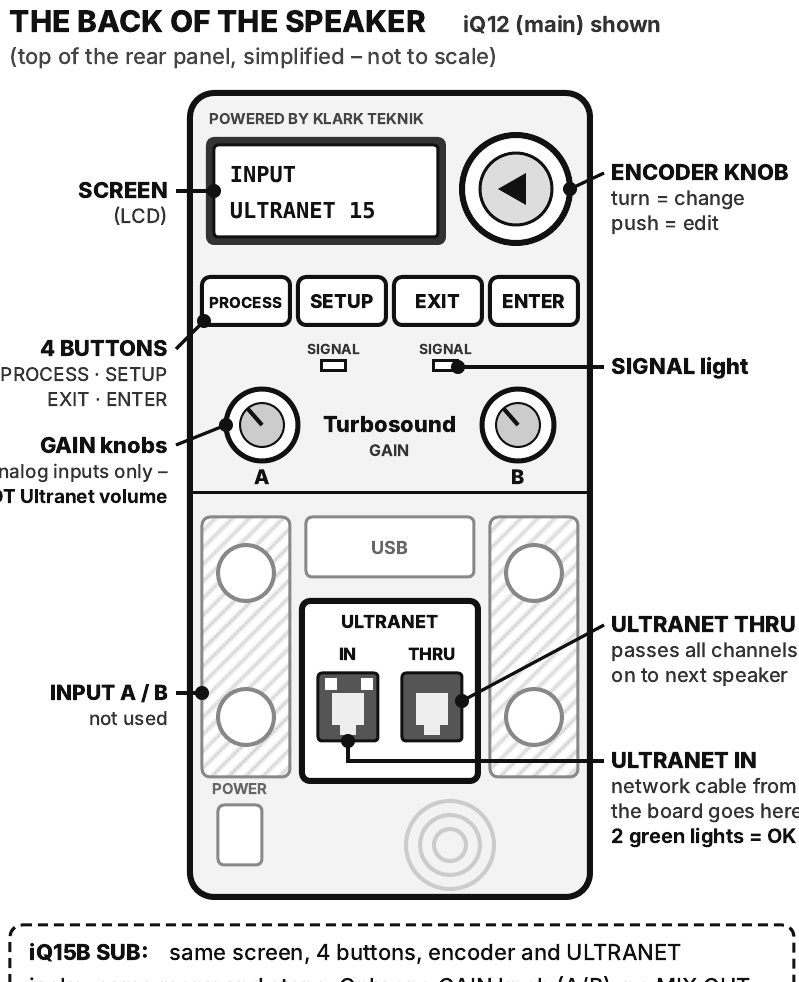
- Check the cable. Speaker ON. Network cable is in ULTRANET IN (not THRU). Both green lights next to it are on.
- Go to input selection. Press the FAR-LEFT button (PROCESS) to get to input selection (INPUT).
- Set the input to ULTRANET. Push the encoder knob (edit), turn it to ULTRANET (not Local), press ENTER.
- Pick the channel number. Push the knob, turn to the number above (15, 13 or 12), press ENTER.
- Save and leave. ENTER saves. Press EXIT to go back to the main screen. Done – repeat on the next speaker.
Lost? Press EXIT to get back to the main screen, start again. Nothing changes until you press ENTER. Newer firmware: use the second button (SETUP) instead. Speaker asks for a password? Ask the Production Lead.
iQ15B sub: same screen, 4 buttons, encoder and ULTRANET jacks, same menu and steps. Only one GAIN knob (A/B), no MIX OUT.
What good looks like: Both green lights on ULTRANET IN are lit. Input screen shows the right channel number (15 or 13 auditorium, 12 lobby). Input is set to ULTRANET (not Local). With music playing, sound comes out and the VU page in the INPUT menu shows your channel moving. The SIGNAL light may flicker with music – if not, trust the VU page; it is the sure test.
If no sound
- Network cable: pushed in firmly at ULTRANET IN (not THRU / USB)? Both green lights on?
- Channel number: matches the quick reference? Input set to ULTRANET (not Local)?
- Volume: GAIN knobs do not affect Ultranet. Check Trim in the INPUT menu is not turned way down, and ask the sound desk if it is up.
- Power: switch on, screen lit?
- Main and lobby swapped? If the main or lobby volume seems wrong, check the speakers weren't swapped (auditorium 15/13, lobby 12/12).
- Still nothing? Ask the Production Lead.
Hookup: where the Ultranet cable comes from
- NORMAL: IEM rack, far-right data port: jack #10 (Ultranet). This is the normal feed for the far house left Turbosound. (⚠ confirm on site)
- BACKUP: an ULTRANET port on the SD16 stage box. Use this as the backup, or if a Turbosound returns to the main service.
Ultranet uses a network (ethernet) cable – not a mic cable.
Connect the loom
- Power and line: connect the loom's power and line to the speaker.
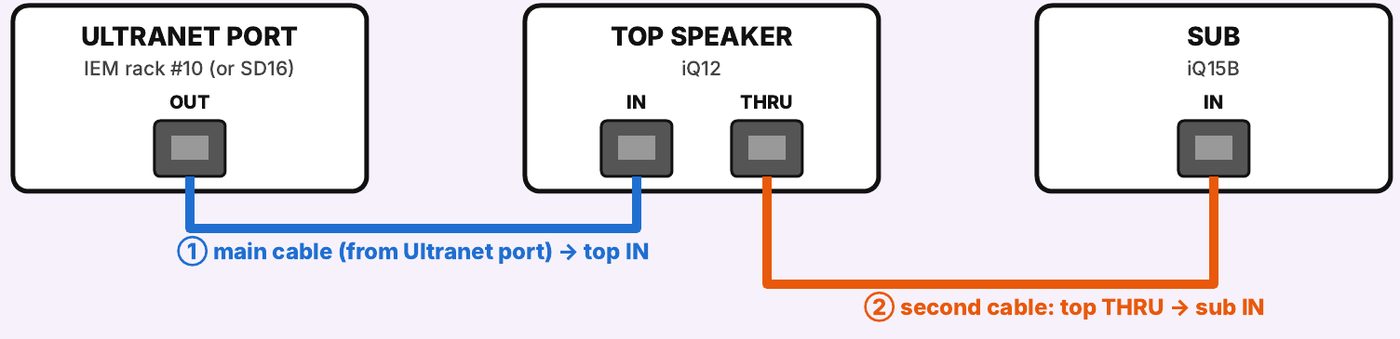
- Main network cable (the one from the Ultranet port) → top speaker's ULTRANET IN.
- Second network cable → top speaker's ULTRANET THRU, then to the sub's ULTRANET IN.
The loom has two network cables at the top speaker.
Mounting
- Set the pole at the third hole from the top.
- Seat the speaker on the REAR pole-stand socket so it sits straight instead of tilting down.
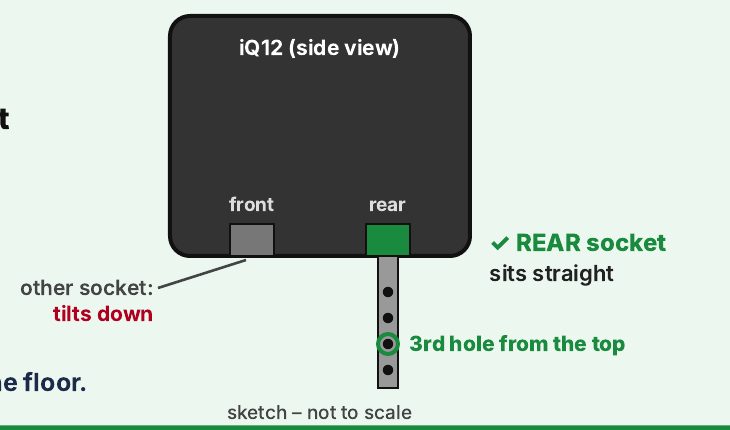
What good looks like: the speaker faces straight out, not down at the floor.
Drawn from the Turbosound iQ12 / iQ15B manual (iQ Series Quick Start Guide, original edition); check against the actual speaker.